Actions
Bug #132
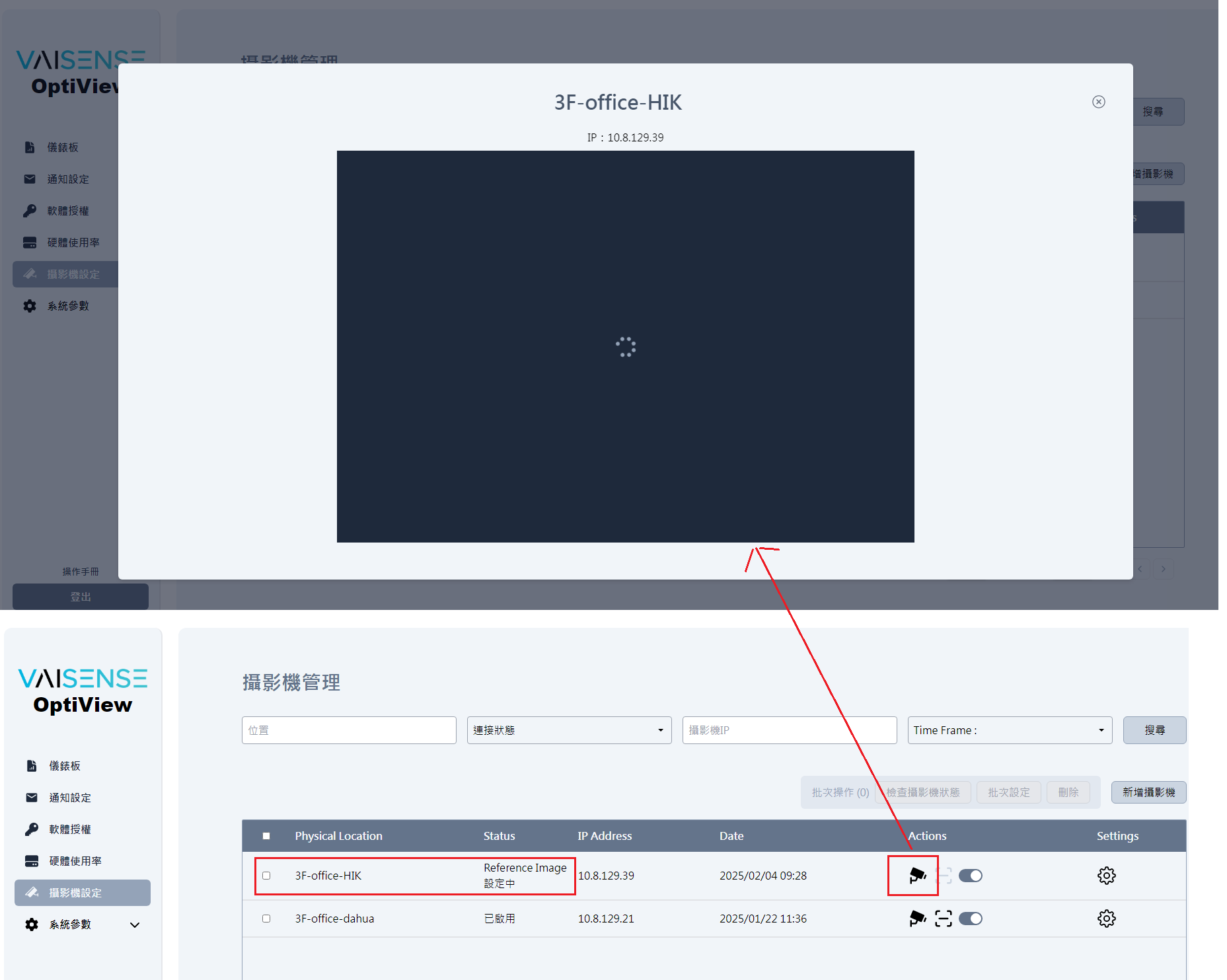
open[OptiView] Cannot view the live stream footage of the selected camera.
Start date:
02/04/2025
Due date:
% Done:
0%
Estimated time:
Description
[Test Environment]
Chrome: 109.0.5414.120
OptiView: 1.4.11
Amber Vision OS: 0.2.1
Cloud: C1
Amber IP: 10.8.129.239
Camera name: 3F-office-HIK
Camera Device Model: DS-IPC-B13HV3-LA
[Step]
1.Launch OptiView > Camera Setting > Add new camera:3F-office-HIK > add successful
2.Click to view the real-time streaming footage of the selected camera
3.Check view live stream status
[Test Result]
Cannot view the live stream footage of the selected camera.
[Expect Result]
Should be able to view the live stream footage of the selected camera.
Files
Updated by Bella Chang about 1 year ago
- Assignee changed from Michael Yi to Shirley Kao
Updated by Michael Yi about 1 year ago
- Assignee changed from Shirley Kao to Lan Chen
Updated by Michael Yi about 1 year ago
- Assignee changed from Lan Chen to Herman Chen
Actions